<?xml version="1.0" encoding="utf-8"?>
<feed xmlns="http://www.w3.org/2005/Atom">
  <title>Reese Blog</title>
  
  <subtitle>Welcome to my world</subtitle>
  <link href="https://reeseliao.github.io/atom.xml" rel="self"/>
  
  <link href="https://reeseliao.github.io/"/>
  <updated>2026-02-24T15:13:03.277Z</updated>
  <id>https://reeseliao.github.io/</id>
  
  <author>
    <name>Reese</name>
    
  </author>
  
  <generator uri="https://hexo.io/">Hexo</generator>
  
  <entry>
    <title>Building a Local Multimodal Video RAG System - Python PoC and Memory Bottlenecks</title>
    <link href="https://reeseliao.github.io/2026/02/23/Building-a-Local-Multimodal-Video-RAG-System/"/>
    <id>https://reeseliao.github.io/2026/02/23/Building-a-Local-Multimodal-Video-RAG-System/</id>
    <published>2026-02-23T06:45:19.000Z</published>
    <updated>2026-02-24T15:13:03.277Z</updated>
    
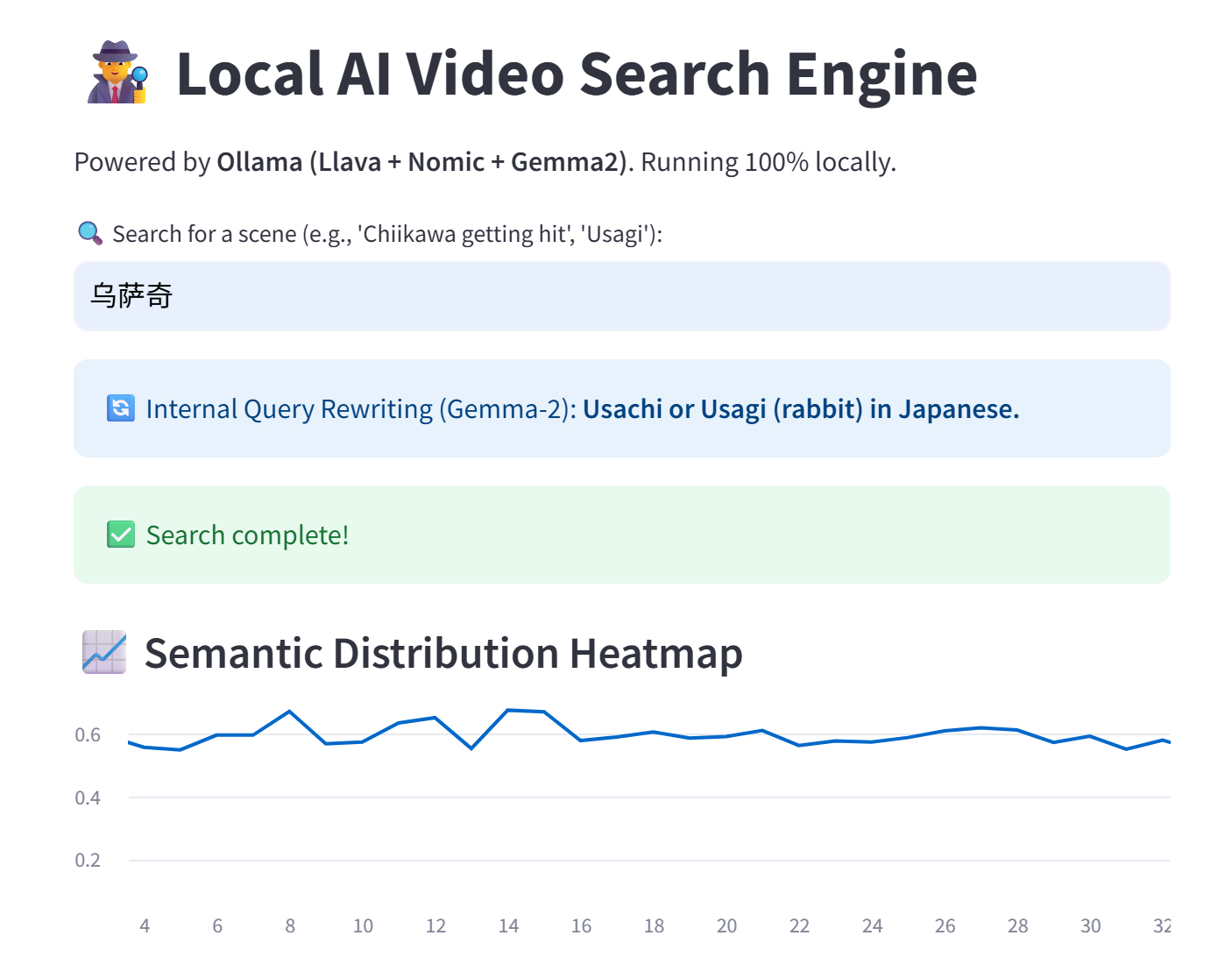
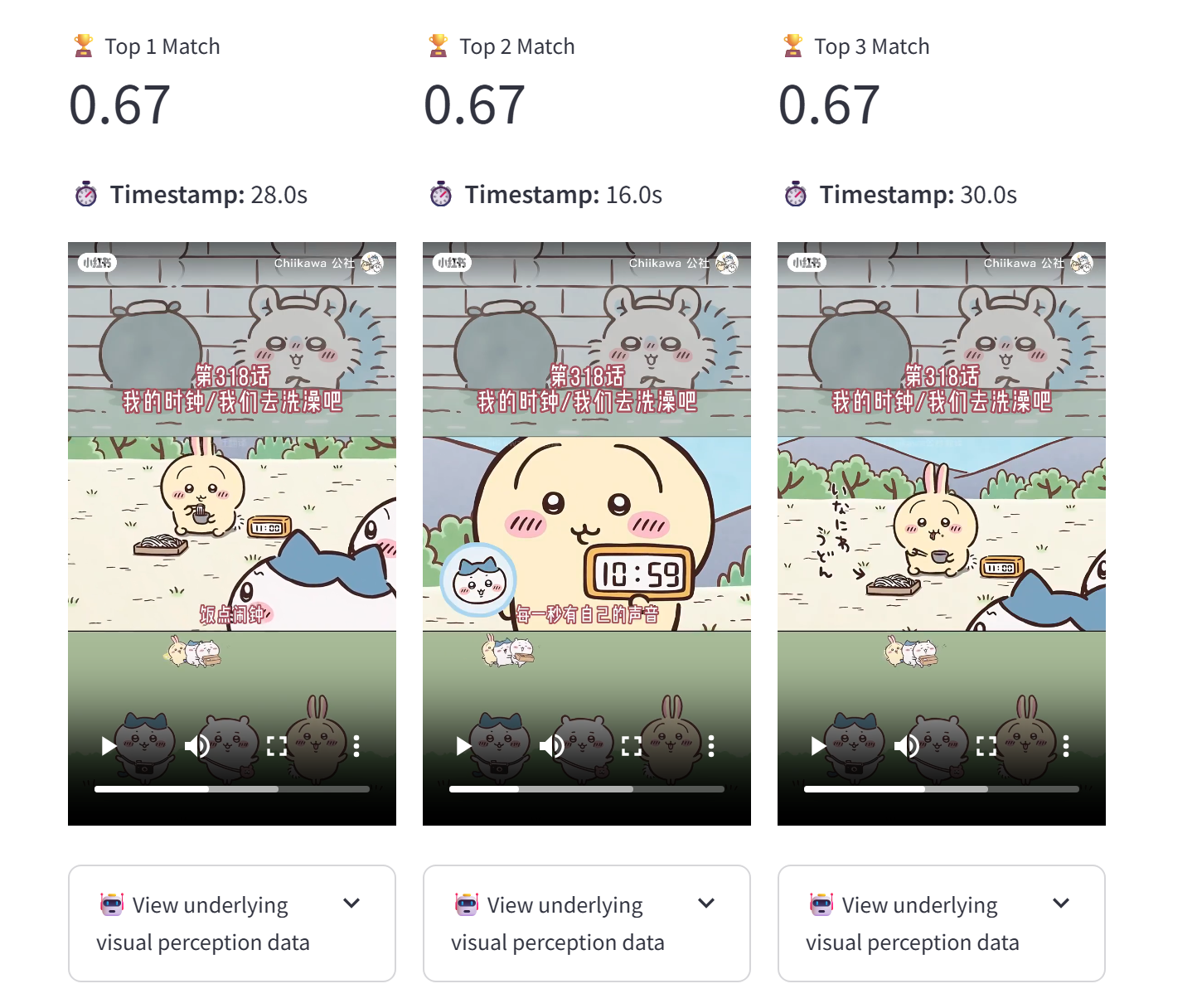
    <content type="html"><![CDATA[<!-- ---title: Building a Local Multimodal Video RAG System: Python PoC and Memory Bottlenecksdate: 2026-02-24 23:00:00tags: [Multimodal, RAG, OpenCV, LLaVA, GSoC]categories:  - AI/LLM--- --><h3 id="Introduction"><a href="#Introduction" class="headerlink" title="Introduction"></a>Introduction</h3><p>Recently, I’ve been exploring how to build a fully localized, privacy-preserving Multimodal Retrieval-Augmented Generation (RAG) system. My specific use case was indexing non-standard animated videos (like <em>Chiikawa</em>) that don’t have embedded subtitles. </p><p>While existing solutions rely heavily on cloud APIs, I wanted to prove that a completely local pipeline is possible on edge devices. Thus, this Python-based Proof-of-Concept (PoC) was born.</p><h3 id="System-Architecture"><a href="#System-Architecture" class="headerlink" title="System Architecture"></a>System Architecture</h3><p>The system relies on a pipeline of <code>OpenCV -&gt; LLaVA (Ollama) -&gt; Gemma 2 -&gt; Nomic Embeddings</code>.</p><p><em>(You can view the detailed system architecture diagram on my <a href="https://github.com/reeseliao/Multimodal_Video_Search">GitHub Repository</a>)</em></p><h3 id="UI-Demo-Cross-Lingual-Search"><a href="#UI-Demo-Cross-Lingual-Search" class="headerlink" title="UI Demo &amp; Cross-Lingual Search"></a>UI Demo &amp; Cross-Lingual Search</h3><p>One of the most interesting parts of this project was using <strong>Gemma 2</strong> for query routing. For example, if a user searches for “乌萨奇” (Chinese), the system translates and optimizes it into English before performing the vector search.</p><p><img src="/img/demo1.png" alt="UI Demo"></p><p><img src="/img/demo2.png" alt="UI Demo2"></p><h3 id="Future-Evolution"><a href="#Future-Evolution" class="headerlink" title="Future Evolution"></a>Future Evolution</h3><p>The current Python-based implementation served its purpose as a functional Proof-of-Concept. However, during the stress tests, I observed significant performance bottlenecks—specifically the Python Global Interpreter Lock (GIL) overhead and memory spikes when handling high-density frame ingestion.</p><p>As a next step, I am planning a <strong>native architectural migration</strong>. Moving the core pipeline to <strong>C++</strong> and leveraging <strong>OpenVINO</strong> for inference would allow for more granular resource management and zero-copy memory operations on edge devices. For me, this project is not just about searching videos; it’s a deep dive into the trade-offs between rapid prototyping and production-grade performance.</p><p>Conclusion: Pure Python is excellent for rapid prototyping, but pushing edge AI to production demands stricter resource control. Moving forward, I plan to explore migrating the core ingestion pipeline to a C++ Native Architecture (potentially with OpenVINO) to bypass the GIL and eliminate memory overhead. This will be a challenging but necessary evolution for the system.</p>]]></content>


    <summary type="html">&lt;!-- ---
title: Building a Local Multimodal Video RAG System: Python PoC and Memory Bottlenecks
date: 2026-02-24 23:00:00
tags: [Multimodal,</summary>


    <category term="AI/LLM" scheme="https://reeseliao.github.io/categories/AI-LLM/"/>
    
    
    <category term="Multimodal" scheme="https://reeseliao.github.io/tags/Multimodal/"/>
    
    <category term="RAG" scheme="https://reeseliao.github.io/tags/RAG/"/>
    
    <category term="OpenCV" scheme="https://reeseliao.github.io/tags/OpenCV/"/>
    
    <category term="LLaVA" scheme="https://reeseliao.github.io/tags/LLaVA/"/>
    
    <category term="GSoC" scheme="https://reeseliao.github.io/tags/GSoC/"/>
    
  </entry>
  
  <entry>
    <title>如何判断点是否在box中</title>
    <link href="https://reeseliao.github.io/2025/07/26/%E5%A6%82%E4%BD%95%E5%88%A4%E6%96%AD%E7%82%B9%E6%98%AF%E5%90%A6%E5%9C%A8box%E4%B8%AD/"/>
    <id>https://reeseliao.github.io/2025/07/26/%E5%A6%82%E4%BD%95%E5%88%A4%E6%96%AD%E7%82%B9%E6%98%AF%E5%90%A6%E5%9C%A8box%E4%B8%AD/</id>
    <published>2025-07-26T14:45:47.000Z</published>
    <updated>2026-01-04T03:34:18.947Z</updated>
    
    <content type="html"><![CDATA[<p>在处理 KITTI 等自动驾驶数据集时，我们经常需要进行数据清洗。其中一个最基础但也最重要的操作，就是判断一个 3D 点（Point）是否位于某个 3D 边界框（Bounding Box）的内部。</p><p>例如，在训练 PointNet++ 进行分类或计数之前，我需要根据标签把前景点（在vehicles，pedestrians，cyclist内的点）提取出来。这里记录两种在我的 <code>DistantCount</code> 项目中用到的实现方法。</p><h3 id="方法一：向量投影法-Vector-Projection"><a href="#方法一：向量投影法-Vector-Projection" class="headerlink" title="方法一：向量投影法 (Vector Projection)"></a>方法一：向量投影法 (Vector Projection)</h3><p>这种方法的思路来源于数学中的向量投影。只要我们知道 Box 的 8 个角点，我们就可以利用点积（Dot Product）将目标点投影到 Box 的三个主轴上，判断投影长度是否在轴长范围内。</p><p>这种方法比较通用，适用于任意方向的 Box，前提是你已经算出了 Box 的 8 个角点。</p><p><strong>代码实现：</strong></p><figure class="highlight python"><table><tr><td class="gutter"><pre><span class="line">1</span><br><span class="line">2</span><br><span class="line">3</span><br><span class="line">4</span><br><span class="line">5</span><br><span class="line">6</span><br><span class="line">7</span><br><span class="line">8</span><br><span class="line">9</span><br><span class="line">10</span><br><span class="line">11</span><br><span class="line">12</span><br><span class="line">13</span><br><span class="line">14</span><br><span class="line">15</span><br><span class="line">16</span><br><span class="line">17</span><br><span class="line">18</span><br><span class="line">19</span><br><span class="line">20</span><br><span class="line">21</span><br><span class="line">22</span><br><span class="line">23</span><br><span class="line">24</span><br><span class="line">25</span><br><span class="line">26</span><br><span class="line">27</span><br><span class="line">28</span><br><span class="line">29</span><br><span class="line">30</span><br><span class="line">31</span><br><span class="line">32</span><br><span class="line">33</span><br><span class="line">34</span><br><span class="line">35</span><br><span class="line">36</span><br><span class="line">37</span><br><span class="line">38</span><br><span class="line">39</span><br><span class="line">40</span><br><span class="line">41</span><br><span class="line">42</span><br><span class="line">43</span><br><span class="line">44</span><br></pre></td><td class="code"><pre><span class="line"><span class="keyword">import</span> numpy <span class="keyword">as</span> np</span><br><span class="line"></span><br><span class="line"><span class="keyword">def</span> <span class="title function_">points_in_box</span>(<span class="params">corners, points</span>):</span><br><span class="line">    <span class="string">&quot;&quot;&quot;</span></span><br><span class="line"><span class="string">    Checks whether points are inside the box.</span></span><br><span class="line"><span class="string">    Picks one corner as reference (p1) and computes the vector to a target point (v).</span></span><br><span class="line"><span class="string">    Then for each of the 3 axes, project v onto the axis and compare the length.</span></span><br><span class="line"><span class="string">    </span></span><br><span class="line"><span class="string">    :param corners: The 8 corners of the box &lt;np.float: 8, 3&gt;</span></span><br><span class="line"><span class="string">    :param points: The points to check &lt;np.float: 3, n&gt;</span></span><br><span class="line"><span class="string">    :return: mask &lt;np.bool: n, &gt; indicating which points are inside</span></span><br><span class="line"><span class="string">    &quot;&quot;&quot;</span></span><br><span class="line">    </span><br><span class="line">    <span class="comment"># 选取一个角点作为原点 p1</span></span><br><span class="line">    <span class="comment"># 选取相邻的三个角点来确定 Box 的三个局部坐标轴方向</span></span><br><span class="line">    p1 = corners[<span class="number">0</span>]</span><br><span class="line">    p_x = corners[<span class="number">1</span>]</span><br><span class="line">    p_y = corners[<span class="number">2</span>]</span><br><span class="line">    p_z = corners[<span class="number">3</span>]</span><br><span class="line"></span><br><span class="line">    <span class="comment"># 计算三个轴的方向向量</span></span><br><span class="line">    i = p_x - p1</span><br><span class="line">    j = p_y - p1</span><br><span class="line">    k = p_z - p1</span><br><span class="line"></span><br><span class="line">    <span class="comment"># 计算目标点到基准点 p1 的向量 v</span></span><br><span class="line">    <span class="comment"># 注意：这里假设 points 是 (3, N) 的形状，如果 (N, 3) 需要相应调整转置</span></span><br><span class="line">    v = (points - np.expand_dims(p1, axis=<span class="number">0</span>)).T</span><br><span class="line"></span><br><span class="line">    <span class="comment"># 将 v 投影到三个轴向量上 (利用点积)</span></span><br><span class="line">    iv = np.dot(i, v)</span><br><span class="line">    jv = np.dot(j, v)</span><br><span class="line">    kv = np.dot(k, v)</span><br><span class="line"></span><br><span class="line">    <span class="comment"># 判断投影长度是否在 0 和轴长之间</span></span><br><span class="line">    <span class="comment"># np.dot(i, i) 就是轴长的平方</span></span><br><span class="line">    mask_x = np.logical_and(<span class="number">0</span> &lt;= iv, iv &lt;= np.dot(i, i))</span><br><span class="line">    mask_y = np.logical_and(<span class="number">0</span> &lt;= jv, jv &lt;= np.dot(j, j))</span><br><span class="line">    mask_z = np.logical_and(<span class="number">0</span> &lt;= kv, kv &lt;= np.dot(k, k))</span><br><span class="line">    </span><br><span class="line">    <span class="comment"># 只有三个方向都满足条件，点才在 Box 内</span></span><br><span class="line">    mask = np.logical_and(np.logical_and(mask_x, mask_y), mask_z)</span><br><span class="line"></span><br><span class="line">    <span class="keyword">return</span> mask</span><br></pre></td></tr></table></figure><h3 id="方法二：坐标系逆变换法-V2X-LiDAR-坐标系"><a href="#方法二：坐标系逆变换法-V2X-LiDAR-坐标系" class="headerlink" title="方法二：坐标系逆变换法 (V2X &#x2F; LiDAR 坐标系)"></a>方法二：坐标系逆变换法 (V2X &#x2F; LiDAR 坐标系)</h3><h3 id="在-V2X-或纯点云任务中，我们通常使用-LiDAR-坐标系（Z-轴向上）。这与-KITTI-的相机坐标系（Y-轴向下）不同，因此旋转矩阵是绕-Z-轴-进行的。"><a href="#在-V2X-或纯点云任务中，我们通常使用-LiDAR-坐标系（Z-轴向上）。这与-KITTI-的相机坐标系（Y-轴向下）不同，因此旋转矩阵是绕-Z-轴-进行的。" class="headerlink" title="在 V2X 或纯点云任务中，我们通常使用 LiDAR 坐标系（Z 轴向上）。这与 KITTI 的相机坐标系（Y 轴向下）不同，因此旋转矩阵是绕 Z 轴 进行的。"></a>在 V2X 或纯点云任务中，我们通常使用 LiDAR 坐标系（Z 轴向上）。这与 KITTI 的相机坐标系（Y 轴向下）不同，因此旋转矩阵是绕 Z 轴 进行的。</h3><p>这种方法的核心思想是：与其把 Box 的 8 个角点算出来（比较麻烦），不如把所有点云变换到Box 的局部坐标系中。一旦在这个局部坐标系下，判断点是否在 Box 内就变成了简单的 <code>abs(x) &lt; length/2</code> 的范围判断。</p><p><strong>代码实现：</strong></p><p>我的 <code>DistantCount</code> 项目是基于 V2X 数据的，因此采用如下的 Z 轴旋转逻辑：</p><pre><code class="language-python">import numpy as npdef in_box_mask(pts, o):    &quot;&quot;&quot;    判断点 pts 是否在由对象 o 定义的 3D Box 中 (V2X/LiDAR Coordinate)    :param pts: 点云数据 &lt;np.array: N, 3&gt;    :param o: 包含 box 信息的字典 (cx, cy, cz, l, w, h, ry)    :return: boolean mask    &quot;&quot;&quot;        # 1. 平移 (Translation)    # 将点云的坐标原点平移到 Box 的中心    # o[&#39;x&#39;], o[&#39;y&#39;], o[&#39;z&#39;] 是 Box 在世界坐标系下的中心点    rel = pts - np.array([o[&#39;x&#39;], o[&#39;y&#39;], o[&#39;z&#39;]])        # 2. 旋转 (Rotation)    # V2X 场景下，物体通常绕 Z 轴旋转    # 我们要把点云“反向”转回与坐标轴对齐的状态，所以使用 -ry    ry = o[&#39;ry&#39;]    c, s = np.cos(-ry), np.sin(-ry)        # 构建绕 Z 轴旋转的矩阵    R = np.array([        [c, -s, 0],        [s,  c, 0],        [0,  0, 1]    ])        # 执行旋转变换    # rel (N,3) dot R.T (3,3) -&gt; (N,3)    loc = rel.dot(R.T)         # 3. 范围判断 (Check Boundaries)    # 在局部坐标系下，Box 的中心就是 (0,0,0)    # 只需要判断点的 x, y, z 是否在 Box 长宽高的范围内    # 注意：需确认 dataset 中 l, w, h 对应局部坐标系的哪个轴，通常 x对应l, y对应w        return (        (np.abs(loc[:, 0]) &lt;= o[&#39;l&#39;] / 2) &amp;  # x 轴方向 (Length)        (np.abs(loc[:, 1]) &lt;= o[&#39;w&#39;] / 2) &amp;  # y 轴方向 (Width)        (np.abs(loc[:, 2]) &lt;= o[&#39;h&#39;] / 2)    # z 轴方向 (Height)    )   ---</code></pre>]]></content>


    <summary type="html">&lt;p&gt;在处理 KITTI 等自动驾驶数据集时，我们经常需要进行数据清洗。其中一个最基础但也最重要的操作，就是判断一个 3D 点（Point）是否位于某个 3D 边界框（Bounding Box）的内部。&lt;/p&gt;
&lt;p&gt;例如，在训练 PointNet++ 进行分类或计数之前，我需要</summary>


    <category term="机器学习" scheme="https://reeseliao.github.io/categories/ml-cv/"/>
    
    <category term="OpenCV" scheme="https://reeseliao.github.io/categories/ml-cv/opencv/"/>
    
    
    <category term="PointCloud" scheme="https://reeseliao.github.io/tags/PointCloud/"/>
    
    <category term="KITTI" scheme="https://reeseliao.github.io/tags/KITTI/"/>
    
    <category term="Python" scheme="https://reeseliao.github.io/tags/Python/"/>
    
    <category term="V2X" scheme="https://reeseliao.github.io/tags/V2X/"/>
    
  </entry>
  
  <entry>
    <title>Hello World</title>
    <link href="https://reeseliao.github.io/2025/06/14/hello-world/"/>
    <id>https://reeseliao.github.io/2025/06/14/hello-world/</id>
    <published>2025-06-13T16:00:00.000Z</published>
    <updated>2026-01-01T13:51:14.206Z</updated>
    
    <content type="html"><![CDATA[<p>Welcome to <a href="https://hexo.io/">Hexo</a>! This is your very first post. Check <a href="https://hexo.io/docs/">documentation</a> for more info. If you get any problems when using Hexo, you can find the answer in <a href="https://hexo.io/docs/troubleshooting.html">troubleshooting</a> or you can ask me on <a href="https://github.com/hexojs/hexo/issues">GitHub</a>.</p><h2 id="Quick-Start"><a href="#Quick-Start" class="headerlink" title="Quick Start"></a>Quick Start</h2><h3 id="Create-a-new-post"><a href="#Create-a-new-post" class="headerlink" title="Create a new post"></a>Create a new post</h3><figure class="highlight bash"><table><tr><td class="gutter"><pre><span class="line">1</span><br></pre></td><td class="code"><pre><span class="line">$ hexo new <span class="string">&quot;My New Post&quot;</span></span><br></pre></td></tr></table></figure><p>More info: <a href="https://hexo.io/docs/writing.html">Writing</a></p><h3 id="Run-server"><a href="#Run-server" class="headerlink" title="Run server"></a>Run server</h3><figure class="highlight bash"><table><tr><td class="gutter"><pre><span class="line">1</span><br></pre></td><td class="code"><pre><span class="line">$ hexo server</span><br></pre></td></tr></table></figure><p>More info: <a href="https://hexo.io/docs/server.html">Server</a></p><h3 id="Generate-static-files"><a href="#Generate-static-files" class="headerlink" title="Generate static files"></a>Generate static files</h3><figure class="highlight bash"><table><tr><td class="gutter"><pre><span class="line">1</span><br></pre></td><td class="code"><pre><span class="line">$ hexo generate</span><br></pre></td></tr></table></figure><p>More info: <a href="https://hexo.io/docs/generating.html">Generating</a></p><h3 id="Deploy-to-remote-sites"><a href="#Deploy-to-remote-sites" class="headerlink" title="Deploy to remote sites"></a>Deploy to remote sites</h3><figure class="highlight bash"><table><tr><td class="gutter"><pre><span class="line">1</span><br></pre></td><td class="code"><pre><span class="line">$ hexo deploy</span><br></pre></td></tr></table></figure><p>More info: <a href="https://hexo.io/docs/one-command-deployment.html">Deployment</a></p><h2 id="评论"><a href="#评论" class="headerlink" title="评论"></a>评论</h2>]]></content>


    <summary type="html">&lt;p&gt;Welcome to &lt;a href=&quot;https://hexo.io/&quot;&gt;Hexo&lt;/a&gt;! This is your very first post. Check &lt;a href=&quot;https://hexo.io/docs/&quot;&gt;documentation&lt;/a&gt; for</summary>


  </entry>
  
</feed>